Episode 1061 · Tuesday, 20 January 2026

SN 1061: More GhostPosting - RAM Crisis Hits Firewalls

General Motors faces FTC action over data sales, Iran moves to disconnect from the global internet, and surging DRAM prices impact tech and cybersecurity.

By Security Now | 2h 44m listen | 20 chapters
SN 1061: More GhostPosting - RAM Crisis Hits Firewalls cover
Security Now · No. 1061

About this episode

The Federal Trade Commission has finalized an order against General Motors and OnStar for collecting and selling consumers' precise geolocation and driving behavior data without informed consent. This action prohibits GM from sharing certain consumer data with reporting agencies for five years, mandating greater transparency and choice for consumers regarding connected vehicle data.

Iran initiated plans on January 8th to permanently disconnect from the global internet, aiming to restrict messaging apps and identify Starlink traffic to counter Western influence. DRAM memory chip prices have surged by 60-70% since last year, with an additional 50% increase expected in Q1, impacting enterprise networking equipment from Fortinet, Palo Alto Networks, and Checkpoint. Anthropic invested $1.5 million in the Python Software Foundation to enhance Python ecosystem security, funding advances for CPython and PyPy and new tools for PyPi package review. Germany is considering legislation granting its intelligence agency, the BND, extensive hacking and surveillance powers, while Grubhub confirmed a data breach and faces extortion demands from the Shiny Hunters cybercrime group. Let's Encrypt now offers six-day TLS certificates, and the DHS is replacing CIPAC with ANCHOR for critical infrastructure security.

Listener Don Edwards shared HD Tune Pro charts demonstrating SpinRite 6.1's ability to restore SSD performance, while Jeff Ekstrand revealed secret Roku menus to access advertising IDs for privacy control. Rob Sherman praised Claude AI's impact on programming productivity, developing an alpha application in an hour. The episode also humorously touched on the absurdity of a "DVD rewinder" and the return of GhostPoster, malicious browser extensions using steganography to deliver JavaScript payloads.


CHAPTER 01 / 20 Discussion

Security Now 1061: Ghost Poster, RAM Pricing, Let's Encrypt Certificates

Security Now episode 1061, recorded on January 20th, 2026, features discussions on the return of Ghost Poster, malicious browser extensions, and the impact of RAM pricing on PCs and enterprise networking equipment. Other topics include FTC actions against General Motors, Germany's planned internet surveillance legislation, Grubhub's extortion by Shiny Hunters, and the availability of six-day certificates from Let's Encrypt.

Security Now· Ghost Poster· RAM pricing· Let's Encrypt· malicious browser extensions

00:00 It's time for Security Now. Steve Gibson is here. We're going to talk about RAM pricing. We're going to talk about CLAWD code and vibe coding. The six-day certificates are now out from Let's Encrypt. And yes, it's the return of Ghost Poster. Malicious browser extensions you need to watch out for. All that coming up next on Security Now. Podcasts you love. From people you trust. This is Twit. This is Security Now with Steve Gibson. Episode 1061 recorded Tuesday, January 20th, 2026. More ghost posting.

00:44 It's time for security now the show we cover your security your privacy how computers work the best sci-fi vitamins Magnesium and more with this man right here. Mr. Steven Gibson. Hello Steve. Am I bored or what? No, you're what you are is a polymath That's the word you have many diverse interests and you are a very quick learner and you like Sharing what you've learned with us and that's grateful i have to say that probably that's all i'll go.

01:21 I was always an enthusiast. I would like get really excited about something for six months and then lose interest and move on to the next thing. You're a little bit more, thank goodness, devoted. A little less. What is that? Is that ADHD or ADD or what? Do they have some initials for that? There's probably some diagnosis. I'm sure there is. We're all on the spectrum somewhere. Yeah. Okay. So, um, We're going to talk about ghost posting again after more worrisome information surfaced following our first discussion of it four podcasts ago. It was our last podcast of 2025. I thought we were done with it, but no.

02:07 But more interesting stuff and some good takeaways, I think, for this SecurityNow number 1061 for what is happening with January. It's almost gone. That's the 20th. I guess our last podcast of January will be next week. So wow. Okay. But we're going to look at other things first, of course. It turns out that not only are PCs Going to be affected by what's happening with ram but there have been some recent studies and surveys that demonstrate that enterprise high end enterprise networking like firewall equipment is similarly going to be hit so.

CHAPTER 02 / 20 Discussion

FTC Clamps Down on General Motors' Data Sales

The FTC has finalized an order against General Motors and OnStar for collecting and selling consumers' precise geolocation and driving behavior data without informed consent. This action prohibits GM from sharing certain consumer data with reporting agencies for five years and mandates greater transparency and choice for consumers regarding their connected vehicle data.

FTC· General Motors· OnStar· driving data· consumer privacy· data brokers

02:54 I'm sorry yeah yeah because the high end equipment is using a lot of ram in order to do what is doing and so we're gonna see that going up to and traffic has provided a sizable support to the python foundation which is good and interesting in a couple ways the ftc has clamped down on general motors secret sale of driving data a new it's not an organization a new i don't know what it is it's a government thing it's it's it's no i know i don't know what it is yeah yeah it's abbreviated anchor a n c h o r which agency

03:39 agency. I like that. That's an agency which replaces C. I don't know how you pronounce this except CPAC, although it's not the CPAC we're all familiar with. CIPAC. That was that agency that was terminated when Trump shortly after Trump became president for the second time, which is that it's that private public information sharing where the industry was relying upon their ability to disclose their own mistakes without fear of retribution from the government. So anyway, we're going to catch up on where that is. Germany, it turns out, is planning to legislate themselves total access to the Internet's global data.

04:31 And Leo, we were talking about the inability to pronounce things before we began the podcast. I've got a German word that, I mean, it looks like the Scrabble set fell on the ground and they just assembled the letters in an arbitrary sequence. Luckily, it's got a three-letter abbreviation. But anyway, we'll talk about this legislation from this organization in Germany. Grubhub has not completely confessed but we now know that they are the shiny hunters most recent extortion victim.

CHAPTER 03 / 20 Discussion

Iran's Permanent Internet Disconnection Plans

Iran plans to permanently disconnect from the global internet, a move initiated on January 8th. Technical reports indicate efforts to restrict messaging apps to internal use and identify Starlink traffic. This decision by Iran's ruling theocracy aims to counter Western influence, despite a young median age in the population.

Iran· internet disconnection· Starlink· messaging apps· theocracy

05:10 Uh-huh. So, Shiny Hunters, the shine has not been lost yet. Let's Encrypt's six-day certs are now available to anyone who wants them, which is the way it should stay. Not mandatory, but yeah, okay. I'm really nervous about my inability to protect my certificate, you know, despite the fact that I'm running a web server that has to have one, you know. Okay, so I want six days. Anyway, we'll get there. Iran has said, well actually not said publicly, but there are internal reports and internal machinations which force people to draw the conclusion

05:53 that they plan to permanently remain off the internet as they have been since January 8th, not coming back. We'll talk about what that means. Also, oh, I got two so cool graphs, an HD tune before and after a live stream An HD tune is a utility, HD as in hard disk. It was run on an SSD by one of our listeners and Spinrite owners before and after. And that's my favorite chart. Also, we've got some great listener feedback. And then we're going to get around to talking about

CHAPTER 04 / 20 Discussion

The DVD Rewinder: A Nostalgic Look

A "DVD rewinder" is humorously discussed, a device marketed to "never pay another DVD rewind fee again." Despite its absurdity for DVDs, it highlights the past practice of Blockbuster charging fees for unrewound VHS tapes. The discussion touches on how younger generations are unfamiliar with VHS, CDs, and DVDs, contrasting with the rapid adoption of AI.

DVD rewinder· Blockbuster· VHS tapes· be kind rewind· video stores· retro technology

13:37 Get started today with Bitwarden's free trial for your business of a Teams or Enterprise plan or get started for free as an individual user bitwarden.com slash twit that's bitwarden.com slash twit. Thank you Bitwarden for supporting Steve and the work he does here. Okay, okay so I found the sales pitch for this device Leo. Okay. It reads never pay another DVD rewind fee again. It's a DVD rewinder. It is a DVD rewinder. Oh, well, wait a minute. I know. Wait, hold on it. No, it's compatible. Wait a minute. All disc formats with DVD are DVD RW.

14:30 DVD plus R, DVD plus RW, CDR, CDRW, audio CD. In fact, you can see down there the little switch. It says DVD or MP3. It'll rewind your audio discs as well. Wow. And then in the marketing material that came along with it, they explained, they said, we've tested the DVD rewinder. With the next generation disc media including blu ray and HD. The DVD Rewinder also works with Sony Playstations, Xbox, and other disc-based console system media. The DVD Rewinder works with all disc-based digital media to provide optimized digital experience. Visual indicators blink and audible sounds are played while your digital media is reversed.

15:28 The DVD rewinder also has get this Leo. This is so clever. A USB port or MP three players and USB media. So it will even rewind your USB media when it hits the end. Even iPods, ladies and gentlemen, everything. It'll rewind your iPod. It's an amazing device. I can't understand why it's no longer available. Sometimes you can find one, a stray one on eBay, but yeah. Sometimes the obvious things, you just miss them. I want this for the next white elephant party, because that would be a great giveaway. Someone comes along and they go, ah, nobody did a

16:17 a rewinder for DVDs. It's like the missing link. Be kind, rewind that DVD. That's right. And the truth is, Leo, that when Blockbuster switched from tapes to DVDs, the employees still put the please be kind, please rewind sticker on DVDs. DVD boxes. Well, that probably stimulated the demand for this. They were well, what are you going to do? You don't want one of those fees. Sometimes in some places which could charge you a fee if you did not rewind your media.

16:54 So you could probably hold this up and show them, Hey, I have a DVD rewinder. These are all the DVDs I'm returning are fully rewound. Steve, you understand there's an entire group of our members of our audience that have no idea what we're talking about. They've never been to a video of our audience. Our But seriously, there's a whole generation that's never seen a VHS cassette. That's true. That's amazing. And soon there'll be a generation that's never seen a CD or DVD. Well, and I was saying to Laurie the other day, imagine kids now growing up

17:36 never being in a world that never had a I that you could talk to and would answer. I mean, it's here. All of us oldies are like, Oh, my God, have you seen what it could do? It is. And every day now the next round, they're gonna be like, Yeah, I just dropped it. Yeah. I just cracked it. Let's hope that does not become the verb. I'm just saying. Yeah. Yeah. Okay. So any of our listeners.

CHAPTER 05 / 20 Discussion

DRAM Price Hikes Impacting Tech and Cybersecurity

DRAM memory chip prices have surged by 60-70% since last year, with an additional 50% increase expected in Q1. This impacts not only PCs and smartphones but also high-end enterprise networking and firewall equipment from companies like Fortinet, Palo Alto Networks, and Checkpoint, leading to thinner margins and higher product prices. AI companies are pre-purchasing most of this year's DRAM supply, and Micron has exited the consumer market to focus on AI and data centers.

DRAM· RAM prices· cybersecurity market· firewall makers· AI companies· Micron· SK Hynix

18:12 who provide purchase planning guidance for high-end network security products may wish to consider advising those who have, you know, make the final decisions that maybe they should be purchasing sooner rather than later if they already know what they were going to do but just haven't pulled the trigger. Some recent commentary about the effect of the rising cost of RAM Will also likely have on the security equipment sector suggested that prices could be expected to rise there as well shortly the commentary said.

18:50 The current price hikes and supply shortage of DRAM memory chips are expected to also impact firewall makers and the cybersecurity market. DRAM is a crucial component for the manufacturing of modern next-gen firewalls, a staple in the cybersecurity defense of any major enterprise. Investment advisory firm Wedbush says firewall companies will see thinner margins this year due to the rising DRAM costs. This will impact their bills of materials, with the extra costs being passed on to consumers as product price increases.

19:29 This will likely lead to lower sales, smaller profit margins, and weaker investor yields. Companies like Fortinet, Palo Alto Networks, and Checkpoint are expected to see the biggest headwinds on the stock market this year as a result of DRAM hikes. Firewall makers join laptop, PC and smartphone vendors, all of which are expected to see big headwinds this year due to collapsing sales. DRAM prices have been up between 60% and 70% since last year and are expected to grow another 50% in the first quarter of the year alone. The production of most of this year's DRAM supply has already been purchased.

20:13 by AI companies for use in their future data centers. DRAM maker Micron has exited the consumer market and focused strictly on supplying AI and data center makers. South Korean company SK hynix is also pondering a similar decision from both the DRAM and NAND slash SSD markets. So, I mentioned previously that i purchased my next small form factor desktop pc from lenovo a couple of months ago before i plan to deploy it probably march another two months still

20:57 And I did that due to the expectation that PC vendors will soon have no choice other than to raise the prices for their systems. And since it'll be done across the board by the industry, it's not like they're going to lose out on the competition. The competition is going to have to do the same thing as well. And I also had mentioned previously several months before that that I was, I become similarly glad to have recently purchased replacement servers for GRC. after the second of the five that I currently had had died. That used up the two dying out of five, what you know, you used up my margin. I know I no longer had any spares. So I wanted to be ready with replacement server standing by in case I were to lose another. At the time, those server replacements were for that just in case.

21:56 instance. But now I'm glad since I always prefer to stuff my servers with as much RAM as they can handle. That's a good thing for their health. And last summer, RAM was still amazingly inexpensive. Not so any longer. So I think that the takeaway here is that if, as I said, if somebody already had plans to purchase high end RAM intensive network security equipment like sometime soon, it might make sense to cut the purchase order like very soon because prices are expected to rise again. Not surprisingly, I am at the the the little small form factor PC that I purchased

22:41 I was unable to max out its RAM and I went looking for the balance and I decided okay I'm gonna wait because this crazy RAM pricing is not expected to last forever. I hope it doesn't. But at the current RAM prices, I'm not willing to buy another 64 gig to bring this thing up to 128. I'll stay where I am, which should be fine. Maybe it was 32 and it can take 64. I don't quite remember. But I looked at current prices and it's like, oh, yeah, I don't need it that badly. I hope you're where you need to be.

CHAPTER 06 / 20 Discussion

Anthropic's $1.5 Million Investment in Python Software Foundation

Anthropic has invested $1.5 million in the Python Software Foundation (PSF) over two years, focusing on Python ecosystem security. This strategic investment will fund security advances for CPython and PyPy, including new tools for automated, proactive review of all packages uploaded to PyPi to combat supply chain attacks. Python is recognized as the primary language of AI, making this a crucial partnership.

Anthropic· Python Software Foundation· PSF· PyPi· CPython· open source security· AI language

23:25 for now, right? And yeah, oh, yeah, I've got I had had at least 32 gig, which may be 64. I'm not sure, but it could take twice what I had. And I thought, well, I want to give it all I can because I expect to be more in a virtual machine environment also moving forward. So last week, the Python Software Foundation announced some very welcome financial support from Anthropic. Under their headline, Anthropic invests $1.5 million in the Python Software Foundation and open source security.

24:04 They wrote, we are thrilled to announce that Anthropic has entered into a two-year partnership with the Python Software Foundation to contribute a landmark total of one and a half million dollars to support the foundation's work with an emphasis on Python ecosystem security. This investment will enable the PSF that's python software foundation the PSF to make crucial security advances to see python which is the product that's the python written in a hybrid of c and python itself. And the python python that compile this written in c and compiles to see but you write in python see python. Yeah it's written in c.

24:48 Well, I think Python in general is written in C, some of the libraries are written in Python, but CPython, instead of, so Python's normally an interpreter. CPython writes C code, which is then compiled. Ah, I see. Gotcha, gotcha. So it outputs C code that is then compiled. Yeah. Got it. That's my understanding. I may be wrong. Correct me if I'm wrong, Chavar. So CPython and also PyPy, which we're talking about all the time for not good reasons, the Python package index will also be receiving the benefit of this. This is great. So yeah, it's really good. And so they said it will also sustain the foundation's core work supporting the Python language ecosystem and global community. This is because Python is really

25:33 the language of AI. Exactly. And they said, Anthropx funds will enable the PSF to buy. Exactly. It's a strategic investment, right? On on Anthropx part. Yeah. Anthropx funds, they said, will enable the PSF to make progress on our security roadmap, including work designed to protect millions of PiPi users from attempted supply chain attacks. And get this, planned projects include creating new tools for automated proactive review of all packages uploaded to PyPi, improving on the current process of reactive only review.

26:17 We intend to create a new dataset of known malware that will allow us to design these novel tools relying on capability analysis. One of the advantages of this project is that we expect the outputs we develop to be transferable to all open source package repositories. As a result, this work has the potential to ultimately improve security across multiple open source ecosystems, starting with the Python ecosystem. This work will build on PSF security developer in residence, Seth Larson's security roadmap, with contributions from PyPi safety and security engineer, Mike Fiedler. Both roles generously funded by Alpha Omega.

27:03 Anthropic support will also go towards the PSF's core work, including the developer in residence program driving contributions to CPython, community support through grants and other programs, running core infrastructure such as PyPy, and more. We could not be more grateful for Anthropic's remarkable support, and we hope you will join us in thanking them for their investment in the PSF and the Python community. So, As you said, Leo, this is great and welcome news. One and a half million likely makes a big difference to the Python project as it would to any volunteer driven open source effort. And given the insane flows of cash

27:48 The AI sector is seeing one and a half million doesn't even qualify as a drop in the bucket it's more like some vapor for the likes of any mainstream commercial AI vendor at the same time much as this will be welcome support on the receiving end you know we should also acknowledge right, that it's likely a clever investment on Anthropx part. You know, the line from the announcement, as I said, that caught my eye, plan projects include creating new tools for automated, proactive review of all packages uploaded to PyPy, improving on the current process. So yes,

28:28 automated proactive review, in other words, deploying AI to examine all newly submitted Python package code. And whose AI do you imagine the Python Software Foundation will choose to deploy? you know given even if it weren't anthropic given clause current code analysis use code anyway that's right yes and drop it solution would probably be the one to choose not gonna rock for that i had there certainly not gonna use a competitor a i with the one and a half million dollars i was kinda wondering if some of that might have been in a i token credit but uh...

29:11 they said cash so yeah anyway i think it's more come every company now uses open source software a lot in fact and ought to really be supporting they everybody should be doing this if you're using open source fund those projects because they're underfunded and they need help and you're making money off of them so put some of it back in. I talk a little bit later again about my plans to switch to Let's Encrypt TLS certs when I'm forced to, and that much as I do for Wikipedia that sends me a little email every month thanking me for my drip of contribution, I'm going to do the same thing for Let's Encrypt because I'll be using their certificate services for free. That's a hell of an infrastructure that needs to keep

CHAPTER 07 / 20 Discussion

FTC Action Against General Motors for Data Sales

The Federal Trade Commission (FTC) finalized an order against General Motors (GM) and OnStar for collecting and selling consumers' precise geolocation and driving behavior data without informed consent. The order imposes a five-year ban on GM disclosing this data to consumer reporting agencies and mandates affirmative express consent for data collection, data access, and deletion requests for consumers. This action highlights the ongoing issue of carmakers and ISPs selling user data without explicit permission.

FTC· General Motors· OnStar· geolocation data· driving behavior· consumer consent· data privacy

30:01 running and going. So yeah, I agree with you, Leo. I think that's it's the right model. One of the more egregious privacy invading behaviors that has come to light is the idea that carmakers might be generating additional revenue for themselves behind their car owners backs by selling data about their individual drivers driving to insurance companies. The question has been whether or not individual drivers may have consented to this.

30:42 I would argue strongly that it is not possible to actually consent to something that's never explicitly described and explained, and which probably appears in a purchase agreements legalese fine print. I've been driving for about 55 years now and I purchased a few cars during that time. I've never attempted to read any of the fine print. I presume that as a US consumer, my rights will be protected by my government's agencies whose job it is to be a check on corporate greed and to make sure that consumers who don't read the fine print get a fair shake nevertheless.

31:26 To that end, last Wednesday the FTC posted an announcement under their headline, FTC finalizes order settling allegations that GM and OnStar collected and sold geolocation data without consumers informed consent. They wrote, The Federal Trade Commission finalized an order with General Motors and OnStar settling allegations that they collected, used, and sold consumers' precise geolocation data and driving behavior data, you know, like acceleration and braking. We know that the cars are tracking that from millions of vehicles without adequately notifying consumers and obtaining their affirmed consent.

32:15 Under the order finalized by the commission general motors LLC general motors holdings LLC and on star LLC collectively gm which are owned by general motors company are prohibited from sharing certain consumer data with consumer reporting agencies. They also are required to take steps to provide greater transparency, which I would argue is any transparency, and choice to consumers over the collection, use, and disclosure of their connected vehicle data. In a complaint first announced in January 2025, so this took a year, the FTC alleged that GM used a misleading enrollment process to get consumers to sign up for its OnStar connected vehicle service and OnStar smart driver feature.

33:09 The FTC also alleged that GM failed to clearly disclose that it collected consumers precise geolocation and driving behavior data via the smart driver feature and sold it to third parties without consumers' consent. The final order approved by the commission imposes a five-year ban on GM disclosing consumers' geolocation and driver behavior data to consumer reporting agencies. This fencing in relief is appropriate given GM's egregious betrayal of consumers' trust. And for the entire 20-year life of the order,

33:49 GM will be required to, and we have four bullet points, obtain affirmative express consent from consumers prior to collecting, using, or sharing connected vehicle data, including sharing data with consumer reporting agencies, with some exceptions such as for providing location data to emergency first responders. Second, create a way for all US consumers to request a copy of their data and seek its deletion. Third, give consumers the ability to disable the collection of precise geolocation data from their vehicles if their vehicle has the necessary technology. And finally, provide a way for consumers to opt out of the collection of geolocation and driver behavior data with some limited exceptions, again, like emergency conditions. The commission, I got a kick out of this, the commission, they said, voted two to zero

34:50 So Leo, both of the commissioners said, okay, we like this. Thank God it wasn't a tie. So, in addition to General Motors, we know that Hyundai has been found to be sharing its driver's data with a company called Versic. That's one of the major brokers of such information. Both Honda and Toyota are believed to be doing the same. And, you know, this nauseating spying On the part of auto makers feel so similar to the idea of consumer is peace like the all of the companies that we use to connect us to the internet, serotonin monitoring and tracking their own subscribers internet usage and behavior.

35:42 Without knowledge or permission technically right maybe it's in no they'll say something down in there about you know i did for business purposes without ever being express about what it is just to get their attorneys like give them an out legally. And remember, Leo, you used to introduce me on this podcast as the person who coined the term spyware and who created the world's first spyware removal tool. Both of those things are true. I named that first anti-spyware utility Optout and I, oh, I will never forget the raw fury that was expressed in the email end users were sending to that spyware parents company at

36:34 At the time named or eight they they shared some of the email with me I mean all it was way over the top I mean is like get higher security guards to protect your family the people were so upset. But that's how people reacted to the affirmative discovery of secretly installed spyware residing inside their machines. It was never my intention to put Oriate out of business, but it turned out that their entire business model was only viable while they remained unknown and secretive. Once people learned about them, no one wanted anything to do with them.

37:24 My creation and publication of Optout generated so much antipathy toward them that I spoke, as I mentioned, to their leadership on several occasions. I came to understand that individually they were not bad people. The Oriate system was a a revenue generation library that shareware and freeware authors could embed into their software to display advertisements on the app's UI surface. So, the Oriate system was supposed to advertising enable shareware to generate some revenue from the shareware's use. The big mistake

38:12 Oriate made was in relying upon the freeware and shareware authors to notify their users. It was all about notification, notify their users that this was taking place. None of their authors did that. Or if they did, again, it would bury down in the licenses, in the software's license agreement that no one ever bothered to read or understand. I explained to the Oriate management that they needed to take independent responsibility for their operation of their system by displaying their own permission dialogue to get the end users permission.

38:54 most of the anger and oh, it was palpable was over the fact that this was going on behind people's backs, users backs, and it just engendered fear, right? I mean, they were afraid of the idea that something was watching them. So today, The names have changed, but the behavior has not. GM knows that if their users were clearly asked whether they would like to have detailed data about their driving habits sold for GM's profit to third parties who would then resell it to their insurance providers to justify increases in their own insurance rates, who would say, you betcha,

39:42 Sign me up for some of that. Nobody, right? Similarly, ISPs know that no one would want to have their detailed use of the internet resold to data brokers, but ex-ISP employees have said they know firsthand that's happening. So we know that the opinions and votes of our politicians can deeply influence or can be, their votes can be deeply influenced by commercial interests through lobbying. So thank goodness we have independent consumer watchdog agencies such as the FTC

40:23 to watch our backs for us. We want to have insurance companies will give you a, this is how they get around this. It works both ways. Yeah. Well, what they do is they offer you as their insuree reduced rate if you agree to be tracked. Right. And then they have an app that you can install. So that way directly with the company, right? It's not an end. No car company is making money on that. Selling your information without your knowledge. You're agreeing with the insurance company. I think that's okay. Yeah, yeah, yeah, yeah. In that case, I would agree. That's actually good because that reduces our expense. Because insurance companies don't want to insure bad drivers, right? They only want to insure people working on planes. Right.

CHAPTER 08 / 20 Discussion

ANCHOR Replaces CIPAC for Critical Infrastructure Security

The Department of Homeland Security (DHS) is finalizing plans for ANCHOR (Alliance of National Councils for Homeland Operational Resilience), a new body to replace the Critical Infrastructure Partnership Advisory Council (CIPAC). ANCHOR aims to serve as a communication hub between industry and government for discussing threats to US critical infrastructure, including cyberattacks. A key focus is re-establishing liability protections for industry executives to encourage open dialogue without fear of government reprisals, a feature that was central to CIPAC.

ANCHOR· CIPAC· Department of Homeland Security· DHS· critical infrastructure· cybersecurity· liability protections

48:44 All right. Okay. So last year we touched upon the crucial need for industry executives to be able to disclose known security incidents, that is, you know, their own known security incidents. And these are like, you know, infrastructure agencies, you know, major power companies and so forth to government officials without fear of reprisals from the government. This was the critical role that CIPAC had. I guess CPAC. CIPAC stood for the Critical Infrastructure Partnership Advisory Council. Last Wednesday, the publication CyberScoop published a very nice piece about the pending replacement agency.

49:35 CyberScoop wrote, the Department of Homeland Security is finalizing plans for a new body that would replace the functions of the Critical Infrastructure Partnership Advisory Council, CPAC, and serve as a communications hub between industry and government to discuss ongoing threats to US critical infrastructure, including from cyber attacks. Under previous administrations, CPAC served as a nerve center for federal agencies, industry, and other stakeholders. While industry widely praised its utility, the council was one of many DHS advisory bodies that were shuttered last year by Secretary of Homeland Security, Christine Ohm, after President Donald Trump returned to office. Now, according to multiple sources,

50:28 A proposed regulation for a new replacement council is in the final stages of review and approval from NOM's office. The new body will be called the Alliance of National Councils for Homeland Operational Resilience. which is has the initials ANCHOR, A-N-C-H-O-R, Alliance of National Councils for Homeland Operational Resilience and will also serve as an umbrella organization for other federal sector risk management agencies. Its goal is to restart conversations and plan

51:07 planned and planning conversations and planning around infrastructure security that took place under the previous CIPAC, according to a former DHS official. The official who requested anonymity to discuss the administration's plans said all 15 federal sector coordinating councils have been briefed on anchor What are the primary differences between CPAC and anchor will be in structural authorities and liability protections and now the liability protections is the key issue right in that's what industry executives explain that they have desperately needed.

51:51 The article says CPAC was essentially, quote, an advisory council that could be chartered to create other advisory councils that needed secretary level approval and contained rigid rules requiring separate charters for every new council that was then stood up. He said this created a waterfall effect of bureaucracy that made CPAC a poor vehicle for holding broad conversations between not just DHS and industry, but all other federal sector risk management agencies and sector coordinating councils.

52:31 So it kind of sounds like it may have been the way it was implemented before a little bit of a bureaucratic nightmare. The official said, quote, what DHS has strived to do is create a new framework for engaging on threat conversations and pre deliberative policy conversations impacting security outcomes with sectors and the private sector without having to create all these waterfall advisory councils or new charters and all that stuff." Okay, so far that all sounds good, right?

53:08 Any reduction in needless bureaucracy sounds like a good thing. CyberScoops reporting continues saying under CPAC, the original organization, conversations between government and industry were also closed by default, which is a double quotes. So that was a term of art closed by default to the public, which with mandatory liability protections for every conversation and setting. Often, the most the government could do was issue a press release or cite comments under Chatham House rule.

53:48 Under anchor, there is expected to be wider latitude for DHS or other councils to open certain meetings to the public or provide transcripts of conversations they hold with stakeholders. And of course, that could put a chill on the conversations, right? Because previously, the government was essentially gagged. CyberScoop says, however, the official emphasized that liability protections remain one of the last unresolved issues. The administration is still determining when those protections would or would not apply to anchor related discussions between government and industry, and further changes could be made to assuage the industry.

54:34 Other federal laws, such as the Cybersecurity and Information Sharing Act of 2015, only provide liability coverage for one-to-one conversations between a company and the government. The previous entity, CPAC by contrast, provided a liability shield for one to many engagements where a company may engage with federal, state, and local agencies as well as other companies and entities. The officials said, quote, that created a well understood and important liability shield which allowed senior officials all the way up to the CEO of private sector companies to openly communicate with each other.

55:22 Following the initial publication of this reporting, a DHS spokesperson in a statement did not dispute the description of ANCOR provided by CyberScoop, but called discussions of an imminent regulation release premature. The spokesperson said, quote, we look forward to sharing more details once we have something to announce, unquote. This week, Adrienne Lotto of the American Public Power Association told Congress that liability protections in CPAC were critical to fostering open dialogue between industry and government around cybersecurity and infrastructure protection. She also signaled that a new advisory council was forthcoming, saying industry, quote, was apprised by DHS that the administration's proposed CPAC replacement is ready for publication in the Federal Register, unquote, while encouraging the administration to finalize the plans quickly.

56:24 Even with some uncertainty around anchor structure and liability protections many industry executives are likely to embrace the return of information sharing partnerships that they believe were vital to understanding the digital and physical threat landscape facing their industry sectors. Last year, industry groups lamented the disbanding of CPAC to members of Congress, prompting Representative Andrew Garbino, now chair of the Homeland Security Committee, to pledge he would look into this and hopefully speak to the administration to try to fix this." The former DHS official said they expected Anchor to be largely welcomed by many industries who have called for the restoration of CPAC

57:10 even as they look to grapple with the Trump administration's new approach. The official said, quote, everybody who wants to talk in groups is going to be excited to have it back. At the same time, those who are concerned about the amount of risk it opens up will need to see the details. So I clearly recall us reporting on the industry's concern over the disbanding of that original CPAC. Since there were clearly things, there are clearly things that the government alone can do, which private industry may need their help with. If nothing else, setting laws and regulations that allow the industry to do what it needs to do.

58:00 But if a fear of the consequences of divulging serious incidents and problems keeps industries silent, which CPAC didn't because of its blanket liability protection, then that would not be good for anchor. I like the sound of an improved structure that sidesteps the need to design and spawn endless subcommittees and create charters for them and it sounds as though the need for liability protections at least is clearly understood now. So let's hope that you know anchor happens and that it provides the protections that the executives need in order to openly speak with the government and you know at all levels and among themselves. Okay so okay Leo the word is

CHAPTER 09 / 20 Discussion

Germany's Proposed Internet Surveillance Legislation

Germany is considering new legislation that would grant its intelligence agency, the BND, extensive hacking and surveillance powers. The law aims to reduce reliance on the US NSA for threat information and allow the BND to intercept full internet communications, store data for up to six months, and hack foreign ISPs that do not cooperate. The legislation also permits surveillance of foreigners in Germany and journalists from state-run media, raising concerns about privacy and the potential for overreach.

Germany· BND· internet surveillance· hacking powers· NSA· encryption· foreign ISPs

58:55 It's B-U-N-D-E-S-N-A-C-H-R-I-C-H-T-E-N-D-I-E-N-S-T. The Dean's. But this not Rick 10, the NIST perfect. And there you have it. So I have some reporting that was obtained from translations from German. And at this point, since it describes Germany's new legislation as pending, as opposed to enacted, I didn't want to spend

59:35 any more time digging into the source material, which would all have needed translation. And also, my assumption is that if or when this does occur, it will have plenty of multi-sourced coverage translated for us in English. So today I'm just going to share the reporting that I have, and everyone will quickly see why it was worth sharing, you know, as is for now. So the reporting read, German lawmakers are working on a new law that will grant the country's intelligence agency new and extensive hacking and surveillance powers. The primary intent of the new law is to free up the bun bun bun bun bun bun bun bun bun bun bun bun bun bun bun bun bun bun bun bun bun bun bun bun bun bun bun bun bun bun bun bun bun bun bun bun bun bun bun bun bun bun bun bun bun bun bun bun bun bun bun bun bun bun bun bun bun bun bun bun bun bun bun bun bun bun bun bun bun bun bun bun bun bun bun bun bun bun bun bun bun bun bun bun bun bun bun bun bun bun bun bun bun bun bun bun bun bun bun bun bun bun bun bun bun bun bun bun bun bun bun bun bun bun bun bun bun bun bun bun bun bun bun bun bun bun bun bun bun bun bun bun bun bun bun bun bun bun bun bun bun bun bun bun bun bun bun bun bun bun bun bun bun bun bun bun bun bun bun bun bun bun bun bun bun bun bun bun bun bun bun bun bun bun bun bun bun bun bun bun bun bun bun bun bun bun bun bun

1:00:23 Yes. The BND from relying on the U S national security agency, our NSA, which everybody's looking at ways to get around that. Yes. Yeah. Well, because you can't count on it now. Right. For threat information, and bring Germany's interception capabilities on par with other European countries such as France, Italy, the Netherlands, and the UK. According to a draft of the new law obtained by German media, the BND

1:01:02 everyone knows who they are, will have, I guess it's the equivalent of the NSA, right? The Germans NSA is the BND. So that's done. We'll have the power to intercept full internet communications and not just metadata as it is allowed today. The agency will also be allowed to store the data for up to six months, which will allow it to better index and search it for threat intelligence. The BND will also have its offensive hacking mandate extended. The law will allow the agency to hack foreign internet service providers

1:01:44 and retrieve information about its targets if the companies do not cooperate or provide the requested data. What? According to reports, this provision will apply to major U.S. companies, meaning the hackees, This revision, the ability to be hacked by the BND, will apply to major US companies and infrastructure providers like Google, Twitter, and Meta, which have been known to be prickly, imagine that, about surrendering such information in the past.

1:02:20 The agency could previously intercept the communications of individuals abroad, but now the BND will also be allowed to put any foreigner in Germany under surveillance. The same goes for journalists working for foreign state-run media organizations, which German lawmakers say are acting more like agents of a foreign state than independent reporters. Wow. Finally, B and D agents will also be allowed to enter apartments and deploy their federal Trojan on a target device. Great. What could possibly go wrong? The federal Trojan has you've been federally Trojan eyes, according to a report

1:03:10 the new laws draft is 139 pages long because all the words are as long as the BND is, so you need more pages, right? And that almost doubles the BND's previous capabilities. So I think the short version of what this means is thank goodness for state of the art encryption, which we have every reason to believe is utterly unbreakable by anyone. The math is your friend. And while Germany's legislation might at first seem

1:03:47 you know, like egregious overreach. We know that the US National Security Agency, our beloved NSA, has already built a massive data center of over 1 million square feet, about 20 miles south of Salt Lake City, Utah. And while the details are kept close, it's well known to be a massive data storage facility. We've often noted that there may be value in storing massive quantities of encrypted data and probably selectively that cannot be deciphered today but may be decipherable using tomorrow's technology. So it's easy to imagine that the internal encrypted communications of the US's global

1:04:40 adversaries may be tapped and tagged and sent to Utah for long-term archiving. And then once the NSA's quantum computing technologies come online in the future, the public key crypto handshakes that established the ephemeral secret symmetric keys might be broken. And those communications, even though by then no longer current, still might be important to obtain. So I feel, you know, I sometimes feel that the EFFs, you know, the Electronic Freedom Foundation's absolutism about privacy rights and encryption goes a little overboard, you know, like, boy, did their knees jerk quickly.

1:05:31 Yeah, but when we see examples like this of how aggressively foreign governments and our own are pursuing information that for the most part they probably have no need for, they're just sucking it up because they can. I appreciate that the EFF is working to always provide some counter pressure against these tendencies because You know, it just, there does just seem to be an increase in this going on Leo. Yeah. This is perfect forward secrecy protects us against this ultimately though. Right. That's no, no, no. Uh, because, uh, the, all that's happening there is the, the, the perfect sort forward secrecy means that

1:06:17 that the key is changing. But the key is changing because you're continually renegotiating during the communication. But all of those renegotiations are similarly interceptible. So if it were a very static key, then that would be worse. Because you just break one key and you get the entire conversation. Here, you do need to be doing successive re-keying, but the NSA presumably is able to do that. So the new key is arranged using the old key. So once you get the old key, you can find the new key and then you continue to do that as a chain. That's why they're saving everything.

1:07:12 They can have my old messages. Yes, and again, we know law enforcement bitches and moans more than they ever have, but they have also never had a greater wealth of data. All of us went online rather than walking around doing things, and all of this data is being tapped. It's not that there's any great dearth of information available. Okay, so we appreciate

CHAPTER 10 / 20 Discussion

Grubhub Extorted by Shiny Hunters Cybercrime Group

Food delivery platform Grubhub confirmed a data breach where hackers accessed its systems, with sources indicating the company is facing extortion demands from the Shiny Hunters cybercrime group. The hackers are reportedly demanding Bitcoin to prevent the release of older Salesforce data from a February 2025 breach and newer Zendesk data. This incident follows previous reports of scam emails sent from a Grubhub subdomain promoting cryptocurrency scams.

Grubhub· Shiny Hunters· data breach· extortion· Bleeping Computer· Salesforce· Zendesk

1:07:54 that it could happen to anyone. You shared your story with us last week, Leo. I shared that I almost, you know, I got it. Yes, I got a little text that I that me initially like, oh, that looks like now. Whoops. Anyway, now appears that someone inside Grubhub clicked a link they should not have, which permitted the infamous shiny hunters gang to obtain authentication credentials. Bleeping Computer, which reported on this exclusively last Thursday, headlined their reporting, Grubhub Confirms Hackers Stole Data in Recent Security Breach. Bleeping Computer wrote, Food delivery platform Grubhub has confirmed a recent data breach after hackers accessed its systems, which sources tell Bleeping Computer the company is now facing extortion demands.

1:08:50 I'm sorry with with sources telling bleeping computer the company is now facing extortion demands. Grubhub told bleeping computer quote We're aware of unauthorized individuals who recently downloaded data from certain GrubHub systems. We quickly investigated, stopped the activity, and are taking steps to further increase our security posture. Sensitive information such as financial information or order history was not affected." Now, They wrote, GrubHub would not respond to any further questions regarding the breach, including when it occurred, whether customer data was involved, or if they were being extorted. However, the company confirmed that it is working with a third-party cybersecurity firm and has notified law enforcement.

1:09:42 Last month, in other words, clearly something happened. Last month, Bleeping Computer wrote Grubhub was also linked to a wave of scam emails sent from its b.grubhub.com subdomain that promoted a cryptocurrency scam promising a tenfold return on Bitcoin payments. GrubHub said at the time that it contained the issue and took steps to prevent further unauthorized messages but would not answer further questions related to the incident. It's unclear whether the two incidents are connected. While Grubhub would not share further details, multiple sources have told Bleeping Computer that the Shiny Hunters cybercrime group is extorting the company. Bleeping Computer attempted to verify these claims with the threat actors, meaning the Shiny Hunter guys, but they too refused to comment. Now I'll just interject here,

1:10:40 that the threat actors' silence at this juncture would be expected, since part of their promise in return for receiving an extortion payment would be their silence. Since they presumably still hope that the returns from their data breach will result in a payday, much as they have shown a willingness to brag in the past, they're certainly not going to talk to the press until it's clear that doing so would not compromise their negotiations and their extortion payout, if any.

1:11:18 Computer continues according to sources the threat actors are demanding a bitcoin payment to prevent the release of older salesforce data from a february twenty twenty five breach and the newer zendesk data that was stolen in the recent breach. And of course, that all tracks the reporting that we've been doing here, where we noted that a month or two ago, the Shiny Hunters gang had switched to attacking Zendesk users after they had apparently fully played out their multiple earlier Salesforce breaches.

1:11:57 Bleepy Computer concludes writing Grubhub uses Zendesk to power its online support chat system which provides support for orders, account issues, and billing. While it's unclear when the breach occurred, Bleepy Computer was told that it was through secrets and credentials stolen in the recent sales loft drift data theft attacks. So the attacks that keep on giving in August, they wrote threat actors use stolen OAuth tokens for sales lofts Salesforce integration to conduct a data theft campaign between August 8 and August 18 of 2025.

1:12:41 According to a report by Google's threat intelligence team, Mandiant, the stolen data was then used to harvest credentials and secrets to conduct follow-up attacks on other platforms. Google reported by their TIG, their threat intelligence group, that UNC-6395, that's their formal nomenclature for shiny hunters, targeting sensitive credentials such as Amazon Web Services and access keys, passwords, and Snowflake related access tokens.

1:13:17 Shiny hunters claimed at the time to be behind the breach stating they stole approximately 1.5 billion data records from the account contact case opportunity and user Salesforce object tables for 760 companies. companies. So that was a major, somewhat downplayed event and attack. And Leo, we're at an hour, let's take a break. And then we're going to talk about the availability of let's encrypts six day certs now available, fortunately, only if you want them six days. Wow.

CHAPTER 11 / 20 Discussion

Let's Encrypt's New Six-Day TLS Certificates

Let's Encrypt has made short-lived and IP address certificates generally available, valid for 160 hours (just over six days). These opt-in certificates aim to improve security by requiring more frequent validation and reducing reliance on unreliable revocation mechanisms. While the default certificate lifetime will gradually shorten from 90 to 45 days, the necessity of these shorter-lived certificates is questioned, especially given the perceived robustness of modern revocation systems and encryption.

Let's Encrypt· TLS certificates· short-lived certificates· IP address certificates· revocation· security· domain validation

1:18:35 26. We're really looking forward to this is going to be a very fun event and I can't wait to see you out there. We already have heard from a number of people who are coming out just to see you, Steve. So get ready. It's going to be great. I will not be in costume, but I will be there. So, you know, when I tell you what the theme is, which is secret still, uh, you might want to be in cost. You might say, Oh, I can do that. It's not the Grinch. It's not the Grinch. Don't get psyched. Okay. Last Thursday, January 15th, let's encrypt announced under their headline six day and IP address certificates are generally available.

1:19:16 They wrote, short-lived and IP address certificates are now generally available from Let's Encrypt. These certificates are valid, get this Leo, for 160 hours. Wow. Just over six days. That's forever. Yeah. In order to get a short-lived certificate, subscribers simply need to select the short-lived certificate profile in their Acme client. Short-lived certificates improve security by requiring more frequent validation and reducing reliance on unreliable revocation mechanisms. If a certificate's private key is exposed or compromised, revocation has historically been a way to mitigate damage prior to the certificate's expiration. Unfortunately, revocation is an unreliable system,

1:20:12 So many relying parties continue to be vulnerable until the certificate expires, a period as long as 90 days. Well, yeah, 90 for them. With short-lived certificates, that vulnerability window is greatly reduced. Short-lived certificates are opt-in and we have no plan to make them the default at this time. Subscribers that have fully automated their renewal process should be able to switch to short-lived certificates easily if they wish. But we understand that not everyone is in that position and generally comfortable with this significantly shorter lifetime. We hope that over time, everyone moves to automated solutions and we can demonstrate that short-lived certificates work well.

1:21:00 Our default certificate lifetimes will be going from 90 days down to 45 days over the next few years as previously announced. IP address certificates allow server operators to authenticate TLS connections to IP addresses rather than domain names. Let's Encrypt supports both IPv4 and v6. IP address certificates must be short-lived certificates, a decision we made because IP addresses are more transient than

1:21:37 than domain names. So validating more frequently is important. You can learn more about our IP address certificates and the use cases for them from our post announcing our first IP certificate. We'd like to thank the Open Technology Fund and Sovereign Tech Agency along with our sponsors and donors for supporting the development of this work. And as I said before, the shortening of the maximum lifetime of web server DV domain validation certificates will eventually drive GRC, my company, to use Let's Encrypt's free certificates. Once I switch to their solutions, I will definitely establish a periodic voluntary payment to them, much as I have with Wikipedia, as I mentioned at the top of the show, since I feel that it's important to support the infrastructure that makes that possible, even if the

1:22:36 Entire necessity of any of this is something I could not disagree with more. So be it. It's never been clear to me. Who has such a problem holding onto their web servers private keys? All indications are that the entire thing is a made up problem. Remember that even if, even if a bad guy could somehow arrange to obtain a valuable domains certificate, It's not as if just having that in any way allows them to impersonate the target site. They must still somehow arrange to cause their victims' internet traffic to believe that it's going to the real domain's IP address, while it is instead

1:23:30 being rerouted to a spoofed server where the stolen certificate resides. So you need either a DNS compromise also or some physical interception and rerouting of the actual packet traffic must be achieved, none of which is easy to do either. So if this was ever happening If it ever happened, it would be big news. We would know about it. Instead, crickets. And I get it that the Let's Encrypt guys need to say that revocation is broken.

1:24:12 I understand that, but that is no longer true. I have a picture of going to revoked.grc.com on the screen. Anyone's invited to go to revoked.grc.com. It says error sec underscore or error code underscore sec underscore error underscore revoked underscore certificate. No browsers are fooled any longer. And any of our long-term listeners know that I was on to all of this, pointing this out and drawing attention to this as loudly as I could before anybody else was doing so.

1:24:54 I looked a little foolish at the time, like I was tilting at windmills saying that this was a problem. You know, what's the big deal? I created that revoked.grc.com site to clearly demonstrate that none of this was working at the time. It is now, everywhere. And it's even been, you know, solved quickly on the client side with no privacy compromise, thanks to Bloom filters, which we talked about in detail for this specific application. And just so that I'm clear, I think it is truly great that Let's Encrypt is now offering six day TLS DV and IP validated certificates

1:25:39 for those who feel they need them. I don't know why anyone would, but okay. Great. It's the being forced to use shorter life certificates, whether for the web or for code signing that feels so wrong and regressive to me. I don't need a nanny. Few of us do. And as I've said, if anyone did, like if this was actually a problem, it would be making news. The only news it's making is that it's, you know, discomforting everybody who's having to use these increasingly short-lived certificates for no apparent reason. Okay.

CHAPTER 12 / 20 Discussion

Iran's Permanent Internet Disconnection

Iran plans to permanently disconnect from the global internet, a move initiated on January 8th. This decision by the ruling theocracy aims to counter Western influence, which is largely brought to Iran by the internet. Technical reports indicate efforts to restrict messaging apps to internal use and identify Starlink traffic, despite half of Iran's population being under 33-34 years old.

Iran· internet disconnection· theocracy· Starlink· messaging apps· Western influence· population age

1:26:26 Several news outlets are reporting, have reported on something that caught my attention, mostly because it's so sad and in my opinion, wrong-minded. The news is that the country of Iran plans to extend its current disconnection from the internet, which began in the evening of January 8th, their time, permanently. which is hard to even believe, but yes, technical reports have indicated that efforts are being made to restrict the use of messaging apps for internal use only. All satellite dish antennas of all ilk are being gathered up and technology is being finalized to identify network traffic that transits across Starlink and other space-based providers.

1:27:25 Iran's ruling theocracy, it is what it is. It's been clear that the influence of the West largely through, although I guess I would say largely though not exclusively, brought to Iran by the internet. It's been a challenge to the nature of its historical theocratic rule. But Iran's population today is not old. Its median age is somewhere between 33 and 34, meaning that half of Iran's population is younger than 33 to 34, somewhere in that range.

1:28:02 and currently about a quarter of the population are children under the age of 15. So cutting that population off from all external internet access certainly seems, you know, destined to fail in the long run. I, okay, I just wanted to report on that. I imagine we'll be looking at that in the future if in fact that continues. I have, as I mentioned at the top of the show, I've received from one of our listeners and a Spinrite user, a pair of charts that I had never seen before. And I got a big kick out of them. I wanted to share them. The listener's name is Don with two N's, Don Edwards. He wrote, Dear Steve,

1:28:50 You've often mentioned how SpinRite improves SSD performance, and we've seen the results of its benchmark tests. But here's a different view. My friend panicked when his computer would not boot. It has a crucial 480 gigabyte SSD boot disk and a Seagate one terabyte hard drive data disk. Not knowing whether the problem was hardware related or not, I rescued the drives. He meant, you know, removed the drives and connected the SSD to my own desktop PC to see if the data was intact. All appeared fine. So I ran HDTune to look at the smart data and run its benchmark. He included the chart for the before spinrite

CHAPTER 13 / 20 Discussion

SpinRite Improves SSD Performance: HD Tune Charts

Don Edwards, a listener and SpinRite user from Johannesburg, South Africa, shared HD Tune Pro charts demonstrating SpinRite 6.1's ability to restore SSD performance. After an SSD experienced booting issues and showed significant performance degradation, running SpinRite Level 3 for three hours fixed the problems and returned the drive to its original speed, even though no data was lost.

SpinRite· SSD performance· HD Tune· data recovery· crucial SSD· Seagate hard drive· Don Edwards

1:27:25 Iran's ruling theocracy, it is what it is. It's been clear that the influence of the West largely through, although I guess I would say largely though not exclusively, brought to Iran by the internet. It's been a challenge to the nature of its historical theocratic rule. But Iran's population today is not old. Its median age is somewhere between 33 and 34, meaning that half of Iran's population is younger than 33 to 34, somewhere in that range.

1:28:02 and currently about a quarter of the population are children under the age of 15. So cutting that population off from all external internet access certainly seems, you know, destined to fail in the long run. I, okay, I just wanted to report on that. I imagine we'll be looking at that in the future if in fact that continues. I have, as I mentioned at the top of the show, I've received from one of our listeners and a Spinrite user, a pair of charts that I had never seen before. And I got a big kick out of them. I wanted to share them. The listener's name is Don with two N's, Don Edwards. He wrote, Dear Steve,

1:28:50 You've often mentioned how SpinRite improves SSD performance, and we've seen the results of its benchmark tests. But here's a different view. My friend panicked when his computer would not boot. It has a crucial 480 gigabyte SSD boot disk and a Seagate one terabyte hard drive data disk. Not knowing whether the problem was hardware related or not, I rescued the drives. He meant, you know, removed the drives and connected the SSD to my own desktop PC to see if the data was intact. All appeared fine. So I ran HDTune to look at the smart data and run its benchmark. He included the chart for the before spinrite

1:29:46 alongside the chart for the after. He said the drop in performance shown in the HD Tune Pro chart on the left, particularly at the start of the drive, actually it's about the first two thirds, he said was troubling. So I ran Spinrite 6.1 on level three and it took around three hours. I could see it having trouble writing to the drive but in the end no data was lost. Afterward, and he says see the post spinrite chart on the right, it's clearly fixed. I backed up all the data files from his hard drive and put both drives back in the PC. When we plugged in all the cables and screens, his PC worked. So whether it was the SSD or a bad cable connection or something else, I don't know.

1:30:38 But what I do know for sure is that his SSD is working much better than before. The graphs show it and he is very relieved. Keep up the good work, Don Edwards, Johannesburg, South Africa. And Leo, you can see there on the left, many people are familiar with HD Tune. This is showing the drive's speed across the board. across its mass storage surface, essentially. So from zero gigabytes to 480 gigabytes, and the top of the chart is 450 megabytes per second. You would expect a solid state drive being solid state, right? Would just be a straight line.

1:31:26 People who have run HDTune on spinning drives see a characteristic downward stepping in performance, typically going to about half speed by the time they get to the inner cylinders of the drive because those cylinders having a shorter circumference, the data transfer rate is much lower because they have many fewer sectors. Here instead, on this well-used SSD, we see deep downward spikes coming almost down to 50 megabytes per second from the normal of around, well, looks like about 425. It's really bad for past the halfway point and then it goes up high.

1:32:18 And in fact, what's interesting then is if you look at the chart on the right, you'll see first of all, it's all gone from it's got completely fixed from a running a spin right level three on the drive, you do see a little bit reduction in an area that used to look full speed. The reason is, and this surprised us when we began working with Spinrite, those areas on the chart on the left were not actually being read. That's not actually 425 gigabytes per second. Those areas had been trimmed.

1:33:06 So the drive knew they had never been written to, and so it was just giving back zeros. It was sending zeros back. After running Spinrite across the drive, those areas were written to by Spinrite. As soon as the operating system re-trims the drive, which happens, you're able to do it on demand, by command if you wish, Just running the little optimize command in Windows does a retrim on the drive, then it'll run right back up to flatline at maximum speed. But what really matters here is that a drive that was running

1:33:46 like what one eighth as fast as it should and it wasn't booting because there were some errors which didn't show up in in Don's just quick mounting of the drive where it looked like he saw all the files spin right fix those problems and also restored the drive to its original performance anyway just a very cool set of charts you using a third party utility that many of our listeners are used to. Okay, Jeff Ekstrand wrote, you can find, oh, this is so cool. You can find the advertising ID on Roku via some secret menus. On the remote, you can do some convoluted button pushes to access these menus. One of them contains the advertising ID. I do not remember which one. Then he provided a cheat sheet.

CHAPTER 14 / 20 Discussion

Roku Advertising ID and Secret Menus

A listener, Jeff Ekstrand, shared how to access secret menus on Roku devices to find the advertising ID. This ID can be used with California privacy legislation (CalPrivacy) to force data brokers to scrub personal data. The process involves a specific sequence of remote button presses, leading to various hidden screens, including one displaying the advertising ID.

Roku· advertising ID· secret menus· California legislation· CalPrivacy· data brokers· YouTube video

1:33:46 like what one eighth as fast as it should and it wasn't booting because there were some errors which didn't show up in in Don's just quick mounting of the drive where it looked like he saw all the files spin right fix those problems and also restored the drive to its original performance anyway just a very cool set of charts you using a third party utility that many of our listeners are used to. Okay, Jeff Ekstrand wrote, you can find, oh, this is so cool. You can find the advertising ID on Roku via some secret menus. On the remote, you can do some convoluted button pushes to access these menus. One of them contains the advertising ID. I do not remember which one. Then he provided a cheat sheet.

1:34:41 So, and it happens that I played with it. It's the secret screen number two is where the advertising ID is found. This all relates to us talking about the California legislation where you're able to give CalPrivacy this information and then they provide it to the data brokers using that information to help find you in order to force them to scrub your data and to no longer offer it for sale. So if you have a Roku, you press the home button five times, then up, right, down, left, up.

1:35:27 So you sort of go around the arrow pad clockwise, home button five times, then up, right, down, left, up. And sure enough, that suddenly switches the screen and there was my advertising ID, which was a grid formatted identifier, four sets of hyphens with hex code, hexadecimal code of various sizes. So there's a developer settings screen, a wireless secrets screen, a secret screen, secret screen number two, that's where the advertising ID was, an HDMI secret screen, a platform secret screen, channel info menu, and a reboot shortcut.

1:36:13 Although I'm not sure how much of a shortcut that is, you have to hit the home button five times, then up, then the rewind button twice and the fast forward button twice. It's pretty much easier just to use the normal menus. Anyway, I got a link to the YouTube video that this guy found for us. Yeah, and you know, there's a bunch of other information as is generally the case. I'm sure you've seen this too, Leo. These sorts of hidden Easter eggs are initially initially look like, Oh, you found some massive treasure trove. But it's kind of internal counters and stuff that doesn't don't really have much value. It's cool. No, like, what's your MAC address? It's like, Okay, well, I mean, yeah, the MAC address is there for Bluetooth and Wi Fi and so forth. So if

1:37:03 If you want that, you can find it. Anyway, thank you very much, Jeff. I appreciate that. And it's an 11 minute YouTube. It was posted two months ago on November 19. It has had 1.2 million views. So this seems to be of interest to some people. Anyway, I got a kick out of it. Thank you, Jeff. Michael Wright said, hello Steve, I'm a first-time emailer to you who's been listening to your show for a couple of years now and find it a great resource to keep up with developments in the world of cybersecurity. Thanks so much for the podcasts. I'm a week behind with the podcast and today finished last week's podcast.

1:37:48 you made a good point about how there should be no legitimate reason for anyone to have their MongoDB server accessible over the internet. That got me wondering if people are deploying MongoDB servers without even realizing they are publicly accessible. I'm referring to cloud deployments, where for many flavors of deployment, a public IP address is automatically created with traditional on prem, making a server accessible over the internet required work to be done. Right, you got to poke a hole through typically through a NAT or a firewall or something. I mean, you you had to work in order to create a public presence. I think he's right there.

CHAPTER 15 / 20 Discussion

Cloud Deployment Security: MongoDB and Cisco Routers

Michael Wright raised concerns about MongoDB servers being publicly accessible in cloud deployments, often due to users' lack of understanding of cloud security implications. This mirrors early Cisco routers, which had services enabled by default, assuming expert users would secure them. The issue highlights a pervasive problem in the industry where assumptions about user knowledge lead to significant vulnerabilities.

MongoDB· cloud deployment· public IP address· network security· Cisco routers· NAT· firewall

1:36:13 Although I'm not sure how much of a shortcut that is, you have to hit the home button five times, then up, then the rewind button twice and the fast forward button twice. It's pretty much easier just to use the normal menus. Anyway, I got a link to the YouTube video that this guy found for us. Yeah, and you know, there's a bunch of other information as is generally the case. I'm sure you've seen this too, Leo. These sorts of hidden Easter eggs are initially initially look like, Oh, you found some massive treasure trove. But it's kind of internal counters and stuff that doesn't don't really have much value. It's cool. No, like, what's your MAC address? It's like, Okay, well, I mean, yeah, the MAC address is there for Bluetooth and Wi Fi and so forth. So if

1:37:03 If you want that, you can find it. Anyway, thank you very much, Jeff. I appreciate that. And it's an 11 minute YouTube. It was posted two months ago on November 19. It has had 1.2 million views. So this seems to be of interest to some people. Anyway, I got a kick out of it. Thank you, Jeff. Michael Wright said, hello Steve, I'm a first-time emailer to you who's been listening to your show for a couple of years now and find it a great resource to keep up with developments in the world of cybersecurity. Thanks so much for the podcasts. I'm a week behind with the podcast and today finished last week's podcast.

1:37:48 you made a good point about how there should be no legitimate reason for anyone to have their MongoDB server accessible over the internet. That got me wondering if people are deploying MongoDB servers without even realizing they are publicly accessible. I'm referring to cloud deployments, where for many flavors of deployment, a public IP address is automatically created with traditional on prem, making a server accessible over the internet required work to be done. Right, you got to poke a hole through typically through a NAT or a firewall or something. I mean, you you had to work in order to create a public presence. I think he's right there.

1:38:37 He said, for example, oh yeah, he's making my point, creating a NAT rule on a firewall to translate a public IP address to a private IP address. However, with public cloud, this is often done automatically. If people are deploying systems to the cloud without having an understanding of cloud deployment and how this differs from on-prem, I could certainly see how it could be possible to deploy a system without realizing you just made it accessible to anyone, anywhere on the internet. It would be interesting to know how many of the 86,000 exposed servers are using IP addresses reserved for public cloud.

1:39:24 Keep up the great work. P.S. on the topic of British time travel series, he said, I found bodies to be a pretty good effort. Certainly a different take on the subject. Not sure if you've seen that one regards Michael. So I suspect Michael is right and that many of those MongoDB server instances are spun up in the cloud. And although this may be an explanation, it certainly isn't an excuse. What's happening is very wrong. So the question is how? How did this happen? It's likely a case of the user assuming that those in charge are doing the right thing.

1:40:12 whereas those in charge wrongly assume that their users are aware of the implications of spinning up random server instances in the cloud. And they assume that those users will prevent public exposure if they don't want it. In other words, One hand doesn't know what the other one is doing and they each assume that the other one is taking responsibility for the expected and needed network security. The problem is that those who designed these system services heavily promote

1:40:53 They're super ease of use, one click server activation. So they're offering their inherently insecure solutions to a level of user who has very little comprehension, if any, of the full implications of clicking on that, yes, please create a MongoDB server instance for me button. I wanted to focus on this specific instance because i suspect that this lack of communication with its assumption that the other party. Is taking care of securing things has long been a major source of network insecurity for the entire industry.

1:41:39 Several months ago, I noted that the early Cisco routers, which had no built-in notion of public-facing WAN interfaces versus private-facing network LAN interfaces, They treated all of their network interfaces identically. There was no concept of LAN and WAN. Those early routers also had their various network services enabled out of the box. Back then, for example, you had to manually add a no HTTP

1:42:18 command to the router startup configuration script if you did not want the routers built in HTTP server to be running by default. I very clearly recall needing to deliberately turn off a handful of services that I knew I had no need for and I certainly didn't want to have running every time that the router booted and I had to do that every time I set up a Cisco router. The engineer designers of these early routers must have assumed that their devices would only and always be used by other expert network engineers. And since Cisco was always selling the security of their products as one of its benefits, non-expert purchasers reasonably assumed that Cisco would have their back.

1:43:12 and that the routers operation would be secure out of the box when it was anything but. Instead, as we know, it was bristling with enabled and insecure gWiz features that were entirely peripheral to the routers core operation. So the lesson here is that each side's assumptions about the other were wildly incorrect and serious vulnerabilities resulted. This is why a couple months ago when I read that piece from the guy at Cisco who like it you know made it clear that if this actually came to pass they really did finally understand what was going on. So you know thank goodness still we just need more communication and

CHAPTER 16 / 20 Discussion

ScreenConnect Cyberattack and Biometric Authentication

Bob, a listener, experienced a cyberattack where ScreenConnect remote control software was installed on his PC without his interaction, leading to unauthorized money transfers via PayPal. This incident highlights the risks of persistent logins and the need for enhanced security for individual users. Biometric authentication, such as fingerprint readers for high-risk transactions, is proposed as a practical solution to prevent unattended or compromised machine misuse.

ScreenConnect· cyberattack· remote access· PayPal· biometric authentication· persistent logon· Windows Hello

1:44:01 As we've said, these devices absolutely have to be secure out of the box and you have to take serious deliberate action to damage their security, to do things which are insecure. And maybe you have to be asked, are you sure? And maybe you need to be asked, are you really sure? Okay, so I got an email from someone named Bob whose note was cyber attack was my experience unique. He wrote, hello GRC team. I've been a big fan and Spinrite customer since learning about your Spinrite product on the tech guy. Remember that Leo? I heard of that show. He said, recently I experienced a type of cyber attack I had not heard of. I can go into more detail, but basically a program screen connect was remotely installed

1:45:05 on my pc and launched with no interaction by the client me he said i became aware of the attack when i was at my mom's house and my phone started notifying me of money transfers that i did not initiate. I freaked out, as you might imagine. I rushed home and when I got there, I found that my machine had been hijacked. My screens were blacked out with screen connect in large white letters. I was unable to do anything other than shutting down the machine. Yikes. Needless to say, I've been dealing with the aftermath and fortunately I'm not out too much money.

1:45:49 but I found out who my friends and foes are in terms of how they did or did not help me cancel the transactions. In short, PayPal's response was abominable. I assume the criminal used a sniffer to find my IP address and since my machine was idle, they were able to install and launch Screen Connect without detection. He said, Perens, no client interaction to install and launch the software is considered a feature of the product. He said, in my opinion, the software is like a gun. Misuse can lead to devastating results. They offer a free 15-day trial, but I didn't check to see if it is full featured.

1:46:38 What do you think about this? Short of keeping my machine powered off, what could I have done to block this type of attack? Any insight would be appreciated. Regards, Bob." Okay, so this is the nightmare scenario for any individual. I've omitted Bob's last name to protect his identity. No one wants to be required to authenticate with every service we use, every time we use them. So being persistently logged into many services is the choice most of us make.

1:47:20 But with that convenience, that persistent logged on convenience, comes the consequence that anyone and anything that's able to use our persistently logged in computer can act on our behalf. The abuse of persistent logon is what bit Bob. Bob doesn't know, so we don't know exactly how someone managed to crawl into his PC. Through the years of this podcast, we've seen many different ways this could have happened. But by far the most likely is that Bob or someone using Bob's computer clicked on a malicious link.

1:48:06 Last week, as we mentioned, Leo, you shared your own incident which forced you to cancel and have two credit cards reissued. And I mentioned that I'd received a text message that I briefly considered to be valid because by pure chance, it fit into the context of my life and it made sense to me. It's certainly not the least bit far-fetched to imagine that Bob or someone who uses Bob's PC might have made the mistake of clicking on a malicious link in email.

1:48:43 or maybe on a web page, who knows. That's all that's needed. That could have established an outgoing connection to an attacker who is then able to install the client-free ScreenConnect remote control software. The attacker could then have waited until that PC had been left running and unattended, and it could determine that through no use of its keyboard or mouse for some period of time. Then they took the opportunity to begin sending the owner's money to remote accounts. For example, PayPal allows zero authentication transfers of cash from the bank accounts and credit cards associated with the person's PayPal account if they remain logged into PayPal statically.

1:49:36 It just brings up a dialogue on screen. You click, you know, complete the transfer and the money is gone. So when Leo and I speak to the attendees of ThreatLocker Zero Trust World Conference in Florida this coming Wednesday, March 4th, our discussion will be titled, The Call Is Coming From Inside The House. We're going to be talking about the growing need for enterprises to actively protect themselves from anything their own employees might do, whether it's deliberate or inadvertent doesn't matter, since the result of the enterprise is the same either way. Doing this effectively means imposing significant limitations upon everyone who has access to the enterprise's internal network.

1:50:26 I'll be arguing that while it will not be at all easy, there is no longer any other way to further increase security from where we are today. Given everything we've seen in the past year, it's clear that the spoofing of enterprise employees is the next big growth threat vector. But for the individual PC user at home, No one wants to impose severe restrictions upon themselves when they're working within their own safe enclave in their residence. I certainly wouldn't. In this case, this happened to Bob because his PC was able to act without his physical presence to send his money out.

1:51:17 The practical solution to this would be the inclusion of a simple biometric authentication for anything that requires Bob's presence. Having a fingerprint reader integrated into our keyboards or mice to confirm the identity of anyone who is requesting a protected action would prevent these sorts of unattended or other attended attacks. And for example, a sponsor of this podcast, Bitwardens password manager fully supports unlocking with biometric authentication on Windows, Mac OS and Linux. And also using all Chromium based browsers, Firefox and Safari. So setting this up would certainly be possible. Of course, it means incurring this overhead all the time, because there's no way to know if and when

1:52:17 someone might get a hold of your computer behind your back. And even so, this still leaves user spoofing as a problem since something happened to compromise Bob's PC to start with. The most reasonable explanation of how ScreenConnect remote control software found its way onto Bob's machine is it something he did deliberately maybe downloaded and installed some piece of software that incorporated this malicious functionality as a backdoor without ever realizing it so even biometric authentication would not have prevented that initial

1:53:02 event because it was done by him, but requiring authentication for every single high-risk transaction might. We're not there yet, but I wouldn't be surprised if in the future, that's the shape of things. There are available keyboards and mice both that have fingerprint readers built-in and Windows Hello can be engaged to require them for specific actions. So it kind of feels like where we're going to go. It's unfortunate, but if someone wants to really protect their machine against their own or somebody else's who shares their machines misuse, something like that's going to be necessary. And Leo, we're an hour and a half in, let's take a break. And we're going to continue with feedback. Indeed, indeed.

CHAPTER 17 / 20 Discussion

Claude AI's Impact on Programming and Productivity

Rob Sherman, a product manager, shared his experience using Claude AI with Visual Studio Copilot, describing it as "insane how good it is." He developed a fully functioning alpha application in an hour, completing projects that had been delayed for months. While acknowledging a learning curve and issues like token context limits and "hallucinations," he emphasizes the revolutionary and addictive nature of AI-driven coding, suggesting best practices like programming plans and plugins to manage its capabilities.

Claude AI· Visual Studio Copilot· programming· product manager· alpha version· token context· hallucination

2:00:40 He said, Hi Steve, I just finished listening to last week's SN episode and as someone who's been using it constantly since the update came out, I wanted to give you some feedback. In short, it is absolutely insane how good it is. I'm a product manager and not a programmer. So when my CTO told me that I needed to try it, I wasn't sure why. I am now. is that I had an internal project that I had been waiting to get programmer resources for over six months. Once I got Visual Studio set up with Copilot, I gave it my product brief and after answering a few simple questions that Claude had, it began coding. An hour later, I had a fully functioning alpha.

2:01:32 It did all the coding, designed and built a UI, and implemented a scanner to get all the data out. Since then, when I have a few hours, I'll just go in and tweak it. that dark mode i've been asking for last year is in there talk over it is labeled i finally got my dark mode that's the beauty of having hyper personal software that can be the name of the love it the bill reporting and error checking i was told we wouldn't be able to do It's done i have also completed three other projects that we weren't supposed to get to until q3. It's amazing i am so sold on it that i got myself a personal license and this weekend did a write up on the e-drama application i've been waiting for someone to build i gave up the clod and now i have my very own alpha version.

2:02:34 This is so addictive. I completely know how this guy feels. He said, this is not to say that it has been 100% smooth sailing. There's a learning curve to Claude especially. And I have blown through my 200% of my monthly request at work in 14 days. He said, a few tips for anyone looking to get started with this first. First, your individual chats, he has in quotes with Claude, have a size limit. Once you hit that limit, you have to start a new chat. If you're just asking it a simple question, you'll be fine. But any larger projects, you will run out of room. I recommend starting any project by having Claude write up a programming plan and tracking document.

2:03:25 then have it keep those files updated. That way, if you have to start a new chat, you can tell it to go read those docs to get up to speed. That's sort of like chaining these chats together, he said. Second, Claude in Visual Studio Copilot won't let you upload PDF or other docs, but you can add MD files. I've taken to having chat GPT summarize any files and turn them into MD format, which I can then put into my project repo. Once in there, Claude is all set.

2:04:06 Third, Claude will lie to you. It is always a good idea to have it double check its own work. I had it write a bunch of new code. When it was done, I told it, hey, would you take a look at this new code and check it for errors? It found four items that needed fixing. Thanks for everything you do. Rob and he's at PS started taking magnesium last week. So Leo on the subject of Claude. It is very addictive. He is just starting to get into it. So there's a few things I would say about his tips. One is, yeah, he's talking about token context. And when you get, the context starts to fill up, it starts to hallucinate. That's when it starts to hallucinate. But there are a lot of tools out there for compacting tokens, for handling this.

2:05:04 He needs what you probably should do start going to youtube and look at some best practices and traffic has a bunch of videos but there are other people who put together a bunch of videos on best practices with clark and then you wanna start looking at cloud skills and plugins because there are a lot of plugins for instance the double check it's on work there are some really good plugins that will call will. use to find flaws to double check itself. There's plugins for security assays. I have Claude do regular security assays, not just on the stuff it writes, but on everything in my system because it's very good at finding flaws. As you start to use it, you will see more and more of stuff that you can do and get it really refined.

2:05:51 It is revolutionary i don't think i've ever seen anything this is reminds me of first discovering the internet. It's amazing and the thing you're just got it the things you're explaining sound like. the early days like you know in three years it's the wild west this all be automatic it'll be built in i mean it will it feels like you know where in the in the learning curve stage the fact that these things have to kind of be learned and figured out and added and done afterwards and so forth well even it's funny even in three o'clock the creators of clod that don't know all of the ins and outs there was a guy

2:06:36 I told you about ralph wiggum the ralph wriggum tool right that was created but just somebody else who said you know if you told claude to keep going to keep looping over and over again until it got to a. a state that you submitted like no more errors, it will. And in fact, Anthropic said, oh, that was a really good idea. And they've now added Ralph Wiggum as part of their official plugin. So there's more, what we're seeing, there's one called Superpower, Harper Reid, who, that's the other thing. If you can find a guru, somebody who's been using Claude and really knows how to use it, that helps too. Harper Reid is my personal guru on this. He was on Twitter on Sunday and he uses something called Superpower.

2:07:19 Which adds a bunch of very good plugins. I would check he says you use superpower. Of course Leo I said What's that and I went and found it most of the steps on github there are a lot of YouTube videos Yeah, you're just getting started. It's amazing and and it's easy to blow through your credits. That's why I ended up getting that Claude max subscription I have been sufficient so that's good we want them to stay in business and if people are getting you know i mean it sounds like it would be easy to get two hundred dollars a month worth of value out of it i feel really using it that was the question i thought is this worth it.

2:07:58 And then i thought you know if i were gonna buy software to do these things i spent a lot more than that. Never be exact would be customized wouldn't be exactly what you wanted your look what rob done he's just getting started look all the things he's done already. Yeah your trust. Your trust in cloud will improve as you understand it better and understand where the pitfalls are and things like that. It actually can be pretty, I think very, very reliable. And again, we have pitfalls cause this is the wild west. We're figuring it out. Yeah. And that was my other thought is I don't want to add too many of these third party features and other things because I feel like they're, Anthropic is basically building this in over time.

2:08:41 So, Claude's getting better and better and better, so you don't need to do as much extending it. I hope, as time goes by, it'll probably be able to do everything you want it to do automatically. Yeah, compact your context. And where do you, we were talking before we began recording, because I was talking about a conversation that I listened to you having on MacBreak Weekly about how, from my standpoint, having been programming for about 55 years now, what I recognize is that for me,

2:09:19 my maturity that i have acquired over these decades is about how to solve the problems not what not the syntax of the language i could use any language it's the structure like it's a refinement of the understanding of how this kind of problem should be solved How does that fit into clod i mean it is using other output in order to produce so is it getting that or i guess i wonder. From from the from that kind from that approach to maturity of coding.

2:10:01 Or is it just kind of like solving the problem brute force? And like you, I want to believe that we are adding something of value in our many years of experience, our matter. But I have to say there are people like Rob who've never programmed who are writing pure English prompts and it's getting the job done and it's working. I think, I mean, I like you, I am not as good as you or as experienced as you, but I think like a programmer, I think. So I tend to approach Claude in a more modular way. I don't write single prompts and say, just write it and get back to me when you're done. It's still an iterative process for me, and I feel like I get better results by iterating

2:10:48 With clod so in that case your history of really what humans are great is pattern recognition right in your history. What's what happens in chess to intuition it's into it we think of it is kind of flash of intuition but really it's pattern recognition and you get good at playing chess by by playing hundreds of thousands of games and seeing hundreds of thousands of positions and internalizing that and then use not even a conscious process you go yeah well i can know what you that's the same thing with coding i think you wreck it's pattern recognition that they could talk about design patterns and coding and so i think

2:11:25 it's a higher level you're not writing login code but you understand that well i'm gonna need some login code here i'm gonna want to encrypt my secrets here so i don't accidentally commit him to get hub i'm gonna and so that the beer all of that. Experience is i think still valuable obviously rob who doesn't have that experience still can. Get what he wants done i love the naked i finally got my mind dark mode is hysterical but that's what that's what that's the level you're working at now is your writing your own stuff for yourself i think it's super empowering.

2:12:04 Yeah, it does sound also like it's not instant because he like started going and went off and had dinner and then, you know, came back and it had done it. This is one of the big breakthroughs that's just happened in the last few months is this ability for this to run continuously for many hours. That's brand new. And, uh, I'm a little uncomfortable with it, to be honest. That's why I like to do, do it more modular. Cause it like, It could just like completely hallucinate Skynet. Makes me nervous. But that's why you use things like Ralph Wiggum. You use some of these plugins to control it. So lots of people are running multiple clods at the same time, threads at the same time. This seems to be more and more the best practice for these big things. And then have the- How much does he provide in financing to Anthropic? It could get expensive.

2:12:59 get expensive but what happens is you can actually have i want you you this thread you call number one check on cloud number two make sure he's not doing anything weird so you can they call it a mixture of experts now and you can even do that or have other you can have chat gpt look at the cloud code i mean It's an inception. It's a very interesting world. And you're right. This is why it's fun to get into because it's wild west now. Even the expert, Andrej Karpathy, the man who created the term vibe coding, tweeted on Christmas day. He says, I can't keep up. It's too fast. I can't follow it anymore. There's too much going on. It is an explosion right now of interesting ideas. And I think it,

2:13:50 I think we are very very close to some big i think it's it feels like it's gonna change the world. You know here for the last twenty years we've been lamenting you know security errors in code in five years they may be gone. I can't imagine that cloud code would write a buffer overflow it's just not gonna. it's not gonna use copy is not gonna it knows better than that now there will be subtler things one of the things people point out with a is if it can't. If it's this is this is this is a coding hallucination i got a divide by zero error instead of making sure you don't divide by zero you just hide the error.

2:14:41 That's the equivalent of a Claude Code hallucination. Hide the error. The error doesn't go away. So you gotta watch for things like that. That's the level it's hallucinating at. But I think you can say pretty surely that this will all be ironed out. I think there's no reason. It all feels like first steps sorts of things, just intuitively. Yeah. Wow you can you can teach cloud code not not to make any of those fundamental security errors just don't you know that's bad don't do that. No more stir copy ok last sponsor and then we're gonna talk about the unfortunately the return or the persistence or the previous existence the previous unknown existence of ghost posting.

CHAPTER 18 / 20 Discussion

GhostPoster: Malicious Browser Extensions and Steganography

GhostPoster refers to a campaign of malicious browser extensions that use steganography within PNG icon files to deliver obscured JavaScript payloads. Initially discovered by Koi Security affecting Firefox users, LayerX later found 17 additional extensions targeting Edge and Chrome, with over 840,000 downloads and installations, some active for up to five years. These extensions perform actions like hijacking affiliate traffic, click fraud, and injecting malicious scripts, highlighting the challenge of detecting stealthy malware.

GhostPoster· malicious browser extensions· Firefox· Edge· Chrome· steganography· PNG icon· LayerX· Koi Security

2:20:05 No, not ghost peppers. Ghost posting. Ghost posting. Okay, so our final podcast of 2025 was titled Ghost Poster. For the short summary at the top of the show notes, I summed it up by writing how a PNG icon was used to infect 50,000 Firefox users. Oh, man. The discoverer of 17 different malicious Firefox add-ons was Koi Security, K-O-I. They discovered that PNG icon files were being used to contain and infiltrate obscured JavaScript into user PCs through Firefox extensions.

2:20:55 Some of the extensions were free VPNs and others were junk extensions that, you know, someone who just wanted to collect free browser add-ons might add to their browsers. Nevertheless, more than 50,000 Firefox users had this malicious code running inside their browsers. So one of our takeaways was to avoid collecting crap from obscure sources that you don't really need. And by the way, the phrase free VPN is an oxymoron. Yes, do not know there's something wrong. There's something wrong with a free VPN folks because you know it goes along with free lunch. Okay so that yeah so that was episode 1057. Why are we back here four weeks later for episode 1061?

2:21:48 It's because following Koi Security's discovery, a different firm, LayerX, has reported their discovery of an additional 17 of the same. But this time they're not just attacking Firefox. Users of Edge and Chrome turn out to have been even earlier targets. And get this, with more than 840,000 downloads and installations. So 840,000 downloads and installations. Unfortunately, these attacks are incredibly effective, lucrative, and that's we know what that means, right? They're going to continue. Layer X's disclosure headline was browser extensions gone rogue. The full scope

2:22:41 of the ghost poster campaign. So here's what we now learn from Layer X's follow-on research. They wrote, last month, researchers from Koi Security published a detailed analysis of a malicious Firefox extension, they actually extension family, they dubbed GhostPoster, a browser-based malware leveraging an uncommon and stealthy payload delivery method, steganography. within a PNG icon file. This innovative approach allowed the malware to evade traditional extension security reviews and static analysis tools. Right? Because nobody expected an icon to contain any malicious code, but nor did they expect it to be intelligible. It's a compressed image, so it's just going to be noise.

2:23:38 Not so much. They said following their publication, meaning COI's publication, our investigation identified 17 additional extensions associated with the same infrastructure and tactics, techniques, and procedures, so-called TTPs, tactics, techniques, and procedures. Collectively, these extensions were downloaded over 840,000 times. With some remaining active in the wild for up to five years, the GhostPoster malware employs a multi-stage infection chain designed for stealth and persistence. Payload encoding, the initial loader is embedded within the binary data of an extension's PNG file.

2:24:30 runtime extraction. Upon installation, the extension parses the icon to extract the hidden data, a behavior that deviates from typical extension logic. Delayed activation. The malware delays execution by 48 hours or more and only initiates command and control server communication under specific conditions. And finally, payload retrieval. The extracted loader contacts a remote command and control server to download additional JavaScript-based payloads.

2:25:06 After activation, the malware is capable of stripping and injecting HTTP headers to weaken web security policies, for example, HSTS and CSP, hijacking affiliate traffic monetization, injecting iframes and scripts for click fraud in user tracking, programmatic capture solving and injection of additional malicious scripts for extended control. These features indicate a campaign is not only fine that the campaign is not only financially motivated, but also technically mature, emphasizing operational stealth and longevity, right? I mean, these things were there

2:25:55 in the extension stores for Edge, Firefox, and Chrome for five years in some cases. The infrastructure they wrote, uncovered by Koi Security, was linked to 17 Firefox extensions, all sharing similar obfuscation patterns, command and control behavior, and delayed execution strategies. Our automated extension malware lab feature confirmed the same threat actor infrastructure and was and was also able to distribute extensions on the Google Chrome and Microsoft Edge add-ons store. Our analysis shows the campaign originated on the Microsoft Edge browser with later expansion into Chrome and Firefox.

2:26:46 So I have in the show notes a timeline for anyone who's interested. It provides a chart which shows that the first known extension infected Edge browser users back in February of 2020. And none of this was known until just last month. So from 2020, it's been there. About six weeks later at the end of March of 2020, Firefox was first hit. It was hit again at the beginning of May. Then a run of eight more malicious Edge extensions were released over the course of two years, from the end of August 2020 through the end of September 2022. A month later, at the start of October 22, the first Chrome extension was created. Then things were quiet for nearly two years until another, because these extensions existed and they were just sitting there doing their business.

2:27:43 Two years later, another Edge extension appeared in August of 2024. But then after that, it was all Firefox from the end of October 2024 to today. So it's interesting that throughout all this time, only two known malicious extensions were seen to affect Chrome. It would be interesting to know why, since that's clearly Chrome is clearly the largest potential source of user installations. But in any event, 840,000 is a lot of malware out there.

2:28:23 The layer X people expanded upon coils earlier findings and they reported 17 additional confirmed extensions with with infrastructure overlap and common loader patterns meaning certainly from the same people more than an additional 840 thousand so that's on top of the 50 that koi found bringing us what to 890, almost 900,000 cumulative installs across Firefox, Chrome and Edge. Malicious presence dating back to 2020 indicating long-term operational successes, bypassing all major browser stores security checks. So these bad guys,

2:29:09 now six years ago, found a way to slip malware past all the stores security checks by encoding them in the back end of a PNG icon. And they said, malware variants using alternative delivery mechanisms, which suggests that there is still ongoing experimentation and adaptation. Now, Beyond the previously identified extensions, we observe a more sophisticated and evasive variant associated with the campaign, which by itself accounted for 3,822 installs. I have a picture of it in the show notes only because

2:30:00 Anybody would install this. It shows Firefox browser add-ons. It's got a nice looking icon. It's called Instagram Downloader and it's by Instagram Download. available on Firefox for Android. It's got 28 reviews at a 4.4 seems reasonable, and currently 3822 users. And there's a nice button, download Firefox and get the extension. Who wouldn't do this? I mean, this is the problem. This looks like a legitimate, useful thing.

2:30:43 So in this iteration, which the layer X people found, the malicious logic is embedded within the background script and leverages an image file bundled inside the extension as a covert payload container. At runtime, the background script fetches the image and scans its raw byte sequence for the delimiter in decimal, it's 62626262, which corresponds to the ASCII string of a sequence of four less than symbols.

2:31:20 All data following that marker is decoded as text and stored persistently in chrome.storage.local under the key inst logo, I-N-S-T-L-O-G-O. The stored data is later retrieved, Base64 decoded, and dynamically executed as an additional JavaScript payload. This secondary script introduces further evasion by deliberately sleeping for approximately five days before initiating any network activity. This of course is to thwart security analysis. Security researchers will load up a browser with stuff, set it to running, and watch to see what it does.

2:32:07 they generally won't wait for five days. Users do. Five days afterwards, upon activation, it fetches content from a remote server, extracts server supply data stored as base64 encoded keys and executes the decoded content, enabling ongoing payload updates and extended control. The staged execution flow demonstrates clear evolution toward longer dormancy, modularity, and resilience against both static and behavioral detection mechanisms. They said while Mozilla and Microsoft have removed the known malicious extensions from their respective stores, extensions already installed on systems remain active unless explicitly removed by the user.

2:32:58 This persistence underscores the limitations of store takedowns as a containment strategy, particularly for malware employing delayed activation and modular payload delivery. Okay, now, they listed a bunch of their 17 something called page screenshot clipper only had 86 downloads. The full page screenshot had 2000 downloads, the convert everything, whatever that is had 17,171. But the translate selected text with Google

2:33:40 had a just shy of 160,000 downloads. And among them, the biggest was by all time, the number one was translate selected text with right click had 522,000 downloads. So this translation hook seems to be offering something that people want. Unfortunately, These things were malicious. Um, they're not going to, they're not going to say something you don't want. No, no. I'm going to say something you want. Right. Right. And what, what, what this is T is teaching them is that by offering these bogus translation apps, they're able to get a lot of downloads. So, so that's clearly a hook that,

2:34:33 that interests people. They've figured out what it is people are gonna download for free. It can't be too valuable or you wouldn't think it was free. So it's gotta be something like kind of simple and cool. Well, like that Instagram downloader, right? While we all might determine that something seems fishy about an offer of a free VPN, that screenshot that we showed of the Instagram downloader looks, entirely legitimate and i can imagine downloading it without ever being the wiser so this is really because it's easy for bad guys to write this stuff now i mean the vibe coding that makes it easy for us to write what we want yep yep makes it easy for them to really true

2:35:19 One thing that puzzles me is LayerX's suggestion that the removal of extensions from the web store leaves any already downloaded and installed extensions in place and dangerous. We know that all the browser vendors have the ability to remotely disable any browser extensions that are found to be malicious. I suppose it might be the case that a malicious extension that its malicious publisher withdraws from the store Might slip under the radar since it's no longer being offered if it's removed from the store maybe just doesn't raise a beacon.

2:35:59 And it might also be that the post installation mechanisms which these extensions use by moving their later downloaded code into the browser's permanent store affords them some post removal protection. I don't know. But the convincing appearance of that Instagram download extension is, as I said, that seems unnerving to me. It's important to note that Koi Was aware of around fifty thousand downloads and installs because for whatever reason they apparently were not looking back far enough. The instrumentation that the layer x people had gave them five years of history and they found eight hundred and forty or they found seventeen more extensions whose downloads totaled more than eight hundred forty thousand. So i think one of the important takeaways here is that we must always remember that we can never know what we don't know there's no point

2:36:57 In getting you know overly worked up over things that we cannot control nor excessively worrying over. What we don't know i would just say don't be skeptical don't install extensions just because you know you got room on your toolbar for more of them. You know what is a useful tool keep the things you need and it like seem that they come from real no legitimate enterprises i mean i've obviously i've got. bit bit locker, what am I trying to say bit locker? No, not bit locker. Bit warden, thank you. I'm just blank drawing a blank. I've got I'm sitting here looking at I've got bit bit warden sitting on my toolbar, and a few other things that I trust that I've been using for years, you know, the the the vertical tabs extension for Firefox and a few other things, but I just

2:37:59 Avoid more and that would be the advice everybody rule of thumb for all software install yes as little software as possible it's not just browser extensions it's you know it's like the browser download helper who needs help downloading a file. We used to we used to that was a very common category i don't know some people's heads probably. The boomers amongst us. But yeah, this was always I started saying this on a regular basis on the tech guy show it's like really the real rule is install as little as possible.

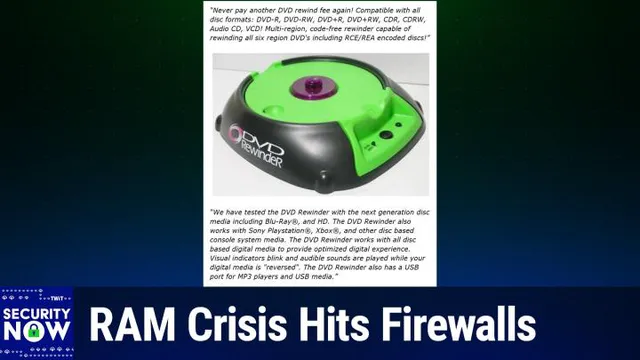
CHAPTER 19 / 20 Discussion

Security Now Outro and Listener Survey

Leo Laporte and Steve Gibson conclude Security Now, inviting listeners to tune in live on Tuesdays or access the podcast and show notes at GRC.com. Steve's website also offers the 16kb and 64kb audio versions, human-written transcripts, SpinRite, and the new DNS Benchmark Pro. Listeners are encouraged to subscribe to the free podcast and participate in the annual Twit survey at Twit.tv/survey26.

Security Now· Leo Laporte· Steve Gibson· Club Twit· GRC.com· SpinRite· DNS Benchmark Pro

2:39:16 The pickings are slim, let's put it that way. Steve, what a great show. Always, always look forward to Tuesdays and I hope you do too, everybody. Make sure you're here. We do the show Tuesday afternoon, right after Mac Break Weekly. That is for us, 1330 Pacific Time, 1630 East Coast Time, 2130 UTC. We stream it live, that's why I mentioned those times. That's when we record the show, but as we're recording, We stream, we stream into the Club Twit Discord. This is one of the benefits our fabulous Club Twit members get. Thank you, Club Twit members. But we also stream it for everybody's delectation on YouTube, Twitch, x.com, Facebook, LinkedIn, and Kick.

2:39:59 you don't have to watch live of course because the podcast you can watch after the fact anytime you want the website has it twitch.tv slash sn there's a youtube channel dedicated to it steve also has it on his website factors a number of reasons you might wanna go there not just to get the podcast steve's got the The very small sixteen kilobit audio version no one else has that no one else has the sixty four kilobit audio version even steve's got that mix to nice and small versions is get transcripts written by a human elaine ferris does a great job, and that is all at GRC.com. Show notes are there as well, although you can get those emailed to you if you go to GRC.com slash email. That is a form that Steve initially set up to whitelist email addresses so that you can email him with suggestions, comments, questions. But it just happens to be at the bottom there are two boxes unchecked. One is for the weekly show notes email. One is for an email list that I don't think he's used

2:41:01 any living memory anyway where he will send out an email when he's got a new product now you are gonna eventually use that for dns benchmark pro right. Yep i'm in the process of updating the the the way the benchmark is. purchased and since that will be part and that will affect the product so i haven't done the the walkthrough video because i have to have that in place first and and as soon as that's done then i'll do the mailing to announce it so this is how conscientious steve is he wants to do it right and this is why we love him

2:41:39 That is the other reason to go to his website by the way, Spinrite, the world's best mass storage maintenance recovery and performance enhancing utility. You saw that graph, that was kind of mind boggling. But also the brand new DNS Benchmark Pro to make sure you're using the fastest DNS provider available to you. That's different for everybody, right? Because it's where you're located. So you got to run it yourself, you can. Really nice little program, not expensive. Lifetime as usual with steve you get a lifetime subscription to it. You could charge monthly, but he doesn't. He doesn't do that. All of that at GRC.com. Everybody hates it. I'm not doing it. Nope. He's also got forums if you want. That's another great place to give him feedback or talk with other SecurityNow fans. We have our forums for everybody. They're open to all at twit.community. There's also a Mastodon instance, which I love. It's kind of my favorite way to hang out. You know, better than X.

2:42:37 That is it with that social in both cases just mention you heard on security now put your right in and let's see what else old. Most important you can subscribe to the show wow what a concept it's free all you have to do is go to your favorite podcast client search for security now leave us a good review and then you get automatically after you press the follow button or the subscribe button or whatever they call it doesn't cost anything i don't like subscribe that implies you have to pay for it. Follow me it's also confusing so there is no good button press the button. Get it automatically every Tuesday after we're done. Well just in the nick of time they've decided to drill something outside So I think this might be a good time to say thank you everybody for joining us and we'll see you next time on security now a week from now the last podcast of January See you Steve, bye

CHAPTER 20 / 20 Discussion

Twit Annual Listener Survey 2026

Leo Laporte urges listeners to complete the annual Twit survey at Twit.tv/survey26. The survey, which closes on January 31st, is crucial for gathering audience feedback and understanding listener demographics.

Twit· listener survey· Twit.tv/survey26· audience feedback· January 31st

2:43:32 Hey everybody, it's Leo Laporte asking you, begging you, pleading with you. There are only a few days left to take our annual Twit survey. This is the best way we have of knowing more about our audience. Help us out. Let us know what you like, what you don't like, who you are. Just fill out the survey. It's on our website. Should only take a few minutes. Twit.tv slash survey 26. Survey closes January 31st, so don't delay. And thank you very much. We really appreciate it. Security now